Skip to content
Steve's Outpost

Section 08 · PC Builds

UPS Sizing for a Homelab

Two numbers on the box, and the smaller one is the one that matters. Get sine wave versus stepped approximation wrong and your equipment refuses to run on battery at all.

By Stephen V.Updated How we pick
#ad

We earn a commission when you buy through our Amazon links, at no extra cost to you. It never changes the order of the picks, and we say so when the cheaper thing is the better buy. How this works.

The verdict first: measure your actual load with a plug-in power meter, buy a pure sine wave UPS rated for at least twice that in watts, and accept that your runtime will be measured in minutes. A UPS is for a clean shutdown and for riding out short cuts — it is not a generator.

VA versus watts, and why the box shows the wrong one first

Every UPS is advertised by its VA rating, and VA is the bigger, more impressive number. The one that constrains you is watts, and it is typically 60 to 70 percent of the VA figure.

A "1500VA" UPS is commonly a 900 to 1000 watt UPS. If your equipment draws 800 watts, the VA rating suggests enormous headroom and the watt rating tells you the truth. Buy on watts, every time.

Sine wave versus stepped approximation — the one that actually breaks things

This is the specification that matters most and gets explained least.

Mains power is a smooth sine wave. Cheaper UPS units approximate it with a stepped square waveform when running on battery. For a lot of equipment — network gear, LED lighting, most external drives — that is completely fine.

Active-PFC power supplies are the problem. Most modern PC and server power supplies use active power factor correction, and a meaningful number of them will not accept a stepped waveform at all. The symptom is not degraded performance. The symptom is the machine shutting off the instant the UPS transfers to battery, which is precisely the failure the UPS was bought to prevent.

The rule: if a computer, a server or a modern NAS is plugged into it, buy pure sine wave. If it is a modem, a router and an access point, stepped approximation is fine and much cheaper.

Sizing, in four steps

  1. Measure, do not estimate. A plug-in power meter on the rack's power strip for a day costs about twenty dollars and removes all the guesswork. Nameplate ratings on equipment are maximums, and real draw is usually far lower.
  2. Note the peak, not the average. Spinning disks starting together draw far more than they do at idle, and the UPS has to survive that moment.
  3. Double it. A UPS running near its watt rating has terrible runtime and shortens its own battery life. Fifty percent load is the comfortable target.
  4. Check the runtime chart for your actual wattage, not the headline. UPS runtime is wildly non-linear — a unit that runs ninety minutes at 100W may run eight minutes at 500W.

Runtime: what a UPS is actually for

Five to fifteen minutes at a realistic load is normal, and it is enough, because the job is not to keep working through an outage. The job is to:

  • Ride out the sub-second dips and brief cuts that make up most power events.
  • Give connected equipment time to shut down cleanly, which is what protects the data.

That second one requires the USB or network connection to be plugged in and the shutdown software configured. A UPS with the data cable in a drawer is a surge protector with a heavy battery in it, and this is the most common way a UPS fails to do its job.

The cheapest UPS win in the house

A small UPS on the modem, the router and the access point. Network gear draws so little that runtime is measured in hours rather than minutes, and the result is that your internet stays up through a cut — including for the phone you are using to find out how long the outage will last. Under a hundred dollars, and most people do it after the first outage rather than before.

Batteries are consumable

UPS batteries last roughly three to five years and they degrade quietly. A UPS with a dead battery reports itself as fine right up until the moment it is needed. Put a replacement date in a calendar, run a self-test periodically, and budget for the battery when you buy the unit — on some models the replacement pack is a substantial fraction of the original price.

The short answer

Quick picks

#ProductBest forScorePrice
01
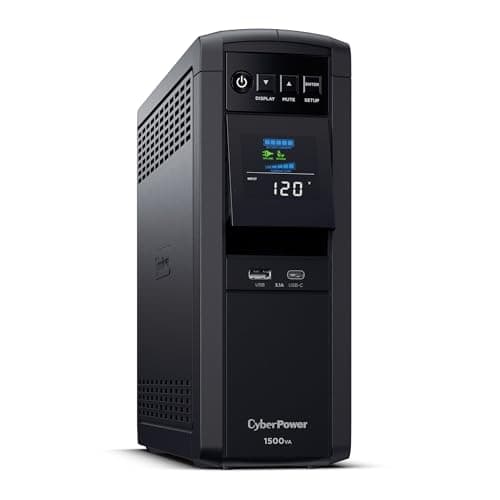
CyberPower CyberPower CP1500PFCLCD Sine Wave UPS, 1500VA/1000W
CyberPower CP1500PFCLCD Sine Wave UPS, 1500VA/1000W

Pure sine wave output and a thousand watts. The sine wave is not an upsell for a homelab — active PFC power supplies, which is most modern equipment, can refuse to switch to a stepped-approximation waveform.

Best homelab UPS
8.8
$239.95Amazon (affiliate link)
02
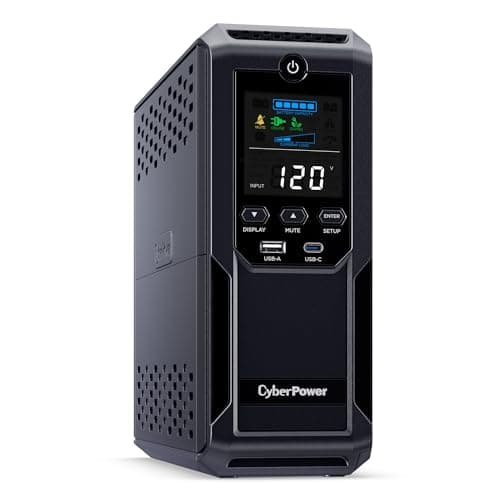
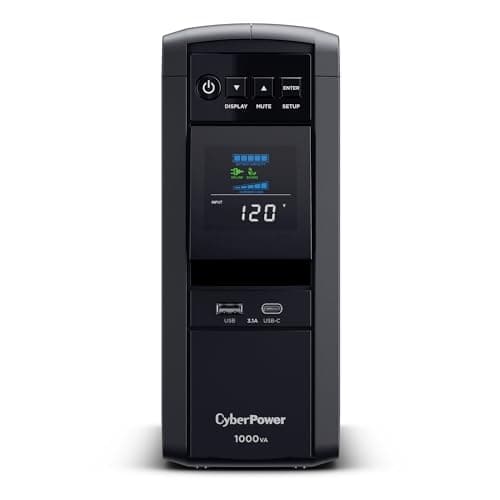
CyberPower CyberPower CP1000PFCLCD Sine Wave UPS, 1000VA/600W
CyberPower CP1000PFCLCD Sine Wave UPS, 1000VA/600W

Six hundred watts of true sine wave for a hundred and eighty dollars. For a rack that draws two hundred watts — which is most home racks — this is the right size and the larger unit is headroom you are paying to carry.

Best value sine wave UPS
8.6
$179.95Amazon (affiliate link)
03
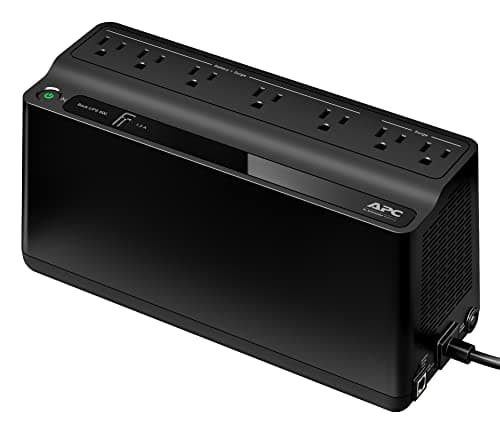
APC APC BE600M1 Back-UPS, 600VA/330W
APC BE600M1 Back-UPS, 600VA/330W

Eighty-four dollars to keep the modem, the router and the access point alive through a cut. That is the highest-value UPS purchase most households will ever make, because it keeps the internet up when the power is not.

Best small UPS
7.4
$83.99Amazon (affiliate link)
04
CyberPower CyberPower CP1500AVRLCD3 Intelligent LCD UPS, 1500VA
CyberPower CP1500AVRLCD3 Intelligent LCD UPS, 1500VA

Cheaper than the sine wave unit and it is the one to buy only if you know your loads tolerate a stepped waveform. Network gear, LED lighting and most external drives do. Active-PFC computer supplies frequently do not.

Best AVR-only option
7.2
$199.95Amazon (affiliate link)
05
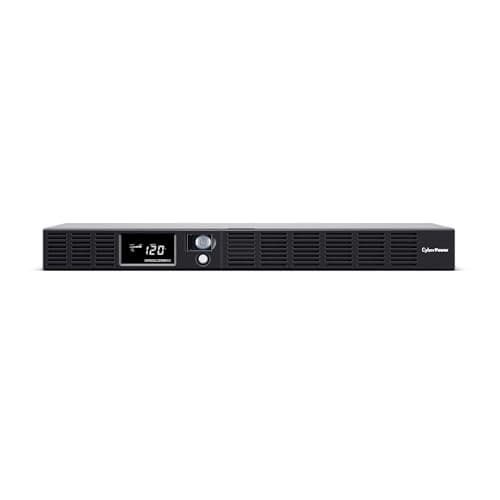
CyberPower CyberPower OR500LCDRM1U Rack-Mount UPS, 500VA/300W
CyberPower OR500LCDRM1U Rack-Mount UPS, 500VA/300W

One rack unit, sine wave output and three hundred watts. Rack-mounting a UPS is worth a real premium for one reason: a tower UPS on the floor is the thing everyone trips over and nobody can reach.

Best rack-mount UPS
6.8
$219.95Amazon (affiliate link)
06
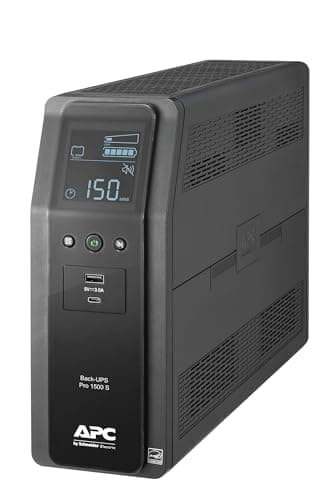
APC APC BR1500MS2 Back-UPS Pro Pure Sine Wave, 1500VA/900W
APC BR1500MS2 Back-UPS Pro Pure Sine Wave, 1500VA/900W

The same specification from the other name in the category. Where it earns the premium is software: APC's PowerChute integrations are more widely supported by NAS operating systems than anyone else's.

Best APC alternative
8.6
$299.99Amazon (affiliate link)
07
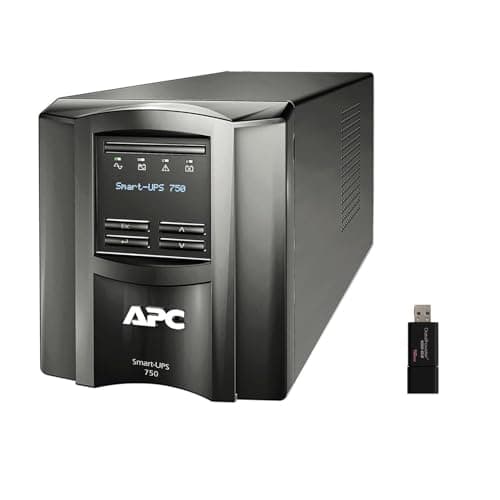
APC APC Smart-UPS SMT750 Tower, 750VA/500W
APC Smart-UPS SMT750 Tower, 750VA/500W

Four hundred and fifteen dollars for five hundred watts. Smart-UPS is genuinely superior equipment built for data centers with service contracts, and in a house you are paying enterprise prices for a runtime you can buy for a third of the money.

Skip this one
5.6
$415.00Amazon (affiliate link)

#ad · Live prices from the Amazon Creators API, as of Sep 7, 2026. Where we have no verified live price we show none — a gap beats a number that has rotted.

In detail

The picks, in full

01
CyberPower CyberPower CP1500PFCLCD Sine Wave UPS, 1500VA/1000W

Best homelab UPS

CyberPower CP1500PFCLCD Sine Wave UPS, 1500VA/1000W

1500VA / 1000WPure sine wave12 outletsUSB monitoring
8.8/10

Pure sine wave output and a thousand watts. The sine wave is not an upsell for a homelab — active PFC power supplies, which is most modern equipment, can refuse to switch to a stepped-approximation waveform.

Waveform quality
10
Capacity
9
Monitoring
9
Build quality
8
Value
8

What's good

  • True sine wave keeps active-PFC power supplies from shutting down on transfer to battery
  • A thousand watts is real headroom for a rack with a NAS, a switch and a small server
  • USB monitoring means a NAS or a Linux box can shut itself down gracefully

What's not

  • Two hundred and forty dollars, which is more than some of the equipment it protects
  • Batteries are consumable and want replacing every three to five years

Skip it if…

you are protecting a router and a modem. That load is under fifty watts and a small UPS does it for a third of the price with more runtime.

$239.95See it on Amazon (affiliate link)

$274.9513% off

Price as of Sep 7, 2026. Prices move — Amazon's is the one that counts.

#ad · we may earn a commission from this link to CyberPower CP1500PFCLCD Sine Wave UPS, 1500VA/1000W

02
CyberPower CyberPower CP1000PFCLCD Sine Wave UPS, 1000VA/600W

Best value sine wave UPS

CyberPower CP1000PFCLCD Sine Wave UPS, 1000VA/600W

1000VA / 600WPure sine waveLCD displayUSB monitoring
8.6/10

Six hundred watts of true sine wave for a hundred and eighty dollars. For a rack that draws two hundred watts — which is most home racks — this is the right size and the larger unit is headroom you are paying to carry.

Waveform quality
10
Capacity
7
Monitoring
9
Footprint
8
Value
9

What's good

  • Same sine wave benefit as the larger unit at three-quarters the price
  • Six hundred watts covers a NAS, a switch, a router and a mini PC with margin
  • Smaller footprint, which matters at the bottom of a rack

What's not

  • Six hundred watts fills up quickly if you add a real server
  • Same battery replacement schedule as the bigger unit, for less capacity

Skip it if…

you intend to add a rack-mount server. Measure the actual draw first — but a server is where 600W stops being enough.

$179.95See it on Amazon (affiliate link)

Price as of Sep 7, 2026. Prices move — Amazon's is the one that counts.

#ad · we may earn a commission from this link to CyberPower CP1000PFCLCD Sine Wave UPS, 1000VA/600W

03
APC APC BE600M1 Back-UPS, 600VA/330W

Best small UPS

APC BE600M1 Back-UPS, 600VA/330W

600VA / 330W7 outletsUSB charging portsStepped-approximation output
7.4/10

Eighty-four dollars to keep the modem, the router and the access point alive through a cut. That is the highest-value UPS purchase most households will ever make, because it keeps the internet up when the power is not.

Capacity
4
Runtime on light loads
9
Waveform quality
4
Footprint
10
Value
10

What's good

  • Network gear draws so little that runtime on this unit is measured in hours, not minutes
  • Small enough to sit behind furniture rather than in a rack
  • Keeps you online during a cut, which is worth more than protecting a machine that is off

What's not

  • Stepped approximation rather than true sine wave — fine for network gear, not for active-PFC computer supplies
  • No graceful-shutdown software worth the name at this tier

Skip it if…

it will power a desktop PC or a server with an active-PFC supply. That is exactly the load that can refuse a stepped waveform, and it is the whole reason the sine-wave units exist.

$83.99See it on Amazon (affiliate link)

Price as of Sep 7, 2026. Prices move — Amazon's is the one that counts.

#ad · we may earn a commission from this link to APC BE600M1 Back-UPS, 600VA/330W

04
CyberPower CyberPower CP1500AVRLCD3 Intelligent LCD UPS, 1500VA

Best AVR-only option

CyberPower CP1500AVRLCD3 Intelligent LCD UPS, 1500VA

1500VAAutomatic voltage regulationLCD panelStepped approximation output
7.2/10

Cheaper than the sine wave unit and it is the one to buy only if you know your loads tolerate a stepped waveform. Network gear, LED lighting and most external drives do. Active-PFC computer supplies frequently do not.

Waveform quality
4
Capacity
8
Voltage regulation
9
Monitoring
8
Value
7

What's good

  • Automatic voltage regulation handles brownouts without going to battery, which extends battery life
  • Forty dollars cheaper than the sine wave version at the same VA rating
  • Good LCD reporting of load and estimated runtime

What's not

  • Stepped approximation output is the specification that decides whether this works for you
  • The saving is small relative to the risk of an incompatible power supply

Skip it if…

you are protecting anything with an active-PFC power supply, which is most modern PCs and servers. Pay the forty dollars for sine wave; the failure mode is your equipment refusing to run on battery at all.

$199.95See it on Amazon (affiliate link)

$219.959% off

Price as of Sep 7, 2026. Prices move — Amazon's is the one that counts.

#ad · we may earn a commission from this link to CyberPower CP1500AVRLCD3 Intelligent LCD UPS, 1500VA

05
CyberPower CyberPower OR500LCDRM1U Rack-Mount UPS, 500VA/300W

Best rack-mount UPS

CyberPower OR500LCDRM1U Rack-Mount UPS, 500VA/300W

500VA / 300W1U rack mountSine waveNetwork management capable
6.8/10

One rack unit, sine wave output and three hundred watts. Rack-mounting a UPS is worth a real premium for one reason: a tower UPS on the floor is the thing everyone trips over and nobody can reach.

Form factor
10
Capacity
4
Waveform quality
9
Noise
5
Value
6

What's good

  • 1U means the UPS is in the rack rather than beside it, which is the whole point of a rack
  • Sine wave output at a size where most rack UPS units are stepped approximation
  • Front LCD is readable in a rack, unlike a tower unit turned to face the wall

What's not

  • Three hundred watts is a small budget — measure your rack draw before committing
  • Rack-mount UPS units cost meaningfully more per watt than tower ones
  • 1U units run their fans harder, so they are audible

Skip it if…

your rack draws more than about two hundred and fifty watts. Go up a size or put a tower unit on the bottom shelf; running a UPS near its limit destroys runtime.

$219.95See it on Amazon (affiliate link)

Price as of Sep 7, 2026. Prices move — Amazon's is the one that counts.

#ad · we may earn a commission from this link to CyberPower OR500LCDRM1U Rack-Mount UPS, 500VA/300W

06
APC APC BR1500MS2 Back-UPS Pro Pure Sine Wave, 1500VA/900W

Best APC alternative

APC BR1500MS2 Back-UPS Pro Pure Sine Wave, 1500VA/900W

1500VA / 900WPure sine wave10 outletsUSB and network monitoring
8.6/10

The same specification from the other name in the category. Where it earns the premium is software: APC's PowerChute integrations are more widely supported by NAS operating systems than anyone else's.

Waveform quality
10
Capacity
8
Software support
10
Build quality
9
Value
6

What's good

  • Broadest support in NAS and hypervisor shutdown software, which is what a UPS is actually for
  • Pure sine wave, so active-PFC supplies are safe
  • Replacement battery packs are easy to find years later, which is not true of every brand

What's not

  • Sixty dollars more than the equivalent CyberPower for very similar hardware
  • Nine hundred watts against the CyberPower's thousand at the same VA rating

Skip it if…

your shutdown software already supports CyberPower and you are shopping on price. The hardware difference is small; the software ecosystem is the reason to choose.

$299.99See it on Amazon (affiliate link)

Price as of Sep 7, 2026. Prices move — Amazon's is the one that counts.

#ad · we may earn a commission from this link to APC BR1500MS2 Back-UPS Pro Pure Sine Wave, 1500VA/900W

07
APC APC Smart-UPS SMT750 Tower, 750VA/500W

Skip this one

APC Smart-UPS SMT750 Tower, 750VA/500W

750VA / 500WLine interactive6 NEMA 5-15R outletsSmart-UPS management
5.6/10

Four hundred and fifteen dollars for five hundred watts. Smart-UPS is genuinely superior equipment built for data centers with service contracts, and in a house you are paying enterprise prices for a runtime you can buy for a third of the money.

Build quality
10
Serviceability
10
Capacity per dollar
2
Suitability for home use
3
Value
3

What's good

  • Serviceable, hot-swappable batteries and management card options that consumer units do not have
  • The correct purchase if this UPS is under a service contract in an office

What's not

  • Nearly twice the price of a consumer sine-wave UPS with twice the wattage
  • Replacement battery cartridges are priced for a business, not a household
  • The management features that justify the price need infrastructure a homelab does not have

Skip it if…

this is a home rack, which on this page it is. Buy the consumer sine-wave unit, budget for a battery every four years, and put the difference into the equipment the UPS is protecting.

$415.00See it on Amazon (affiliate link)

$449.008% off

Price as of Sep 7, 2026. Prices move — Amazon's is the one that counts.

#ad · we may earn a commission from this link to APC Smart-UPS SMT750 Tower, 750VA/500W

Buying notes

Match the unit to the load, honestly

  • Modem, router, access point (under 60W): a small 600VA unit. Hours of runtime, under a hundred dollars.
  • NAS, switch, mini PC (100-250W): a 1000VA pure sine wave unit. This is the size most homelabs actually need.
  • Adding a real server (300-600W): a 1500VA pure sine wave unit, and check the runtime chart at your wattage rather than the headline figure.
  • Rack-mounted: a 1U unit if the floor space genuinely matters. Expect to pay significantly more per watt and to hear the fan.

Software support is a real specification

The point of the USB connection is graceful shutdown. Check that your NAS or hypervisor supports the brand before you buy — this is where APC's wider integration genuinely earns its premium over otherwise-equivalent hardware.

Do not put a laser printer on it

Laser printers draw enormous current when the fuser heats and will overload almost any home UPS. Manufacturers say this explicitly. The same applies to space heaters and anything else with a heating element.

Where the enterprise line stops making sense

Serviceable batteries, hot-swap and network management cards are worth real money in a building with a maintenance contract. In a house they are features you will not use at roughly twice the price per watt — which is why the Smart-UPS is the skip pick above.
How these were picked

I haven't handled these. Here's what I did instead.

Everyone in this category says they tested twenty of these. I haven't tested any, and I say so. What I do instead: read the manufacturer's manual and published specification, compile the numbers that decide the purchase, do the arithmetic in the open, check the live price, and name one product to skip. The scores above are judgments from that research against a published rubric — they are not measurements I took, because I do not have a lab and I am not going to pretend otherwise.

Questions

Frequently asked

VA or watts — which do I size on?
Watts, always. VA is the larger, more marketable number; watts is the real constraint and is typically 60 to 70 percent of the VA figure. A 1500VA unit is often a 900 to 1000 watt unit.
Do I need pure sine wave?
If a computer, server or modern NAS is plugged in, yes — active-PFC power supplies can refuse a stepped waveform entirely and shut down the instant the UPS transfers to battery. For a modem, router and access point, stepped approximation is fine and much cheaper.
How much runtime should I expect?
Five to fifteen minutes at a realistic load, and that is the correct expectation. A UPS exists to ride out short cuts and to allow a clean shutdown, not to keep you working. If you need hours, you need a generator.
How do I measure my actual load?
A plug-in energy meter between the wall and your rack's power strip, left for a day. It costs about twenty dollars and it replaces a lot of arithmetic based on nameplate ratings, which are maximums rather than reality.
How long do UPS batteries last?
Three to five years typically, and they degrade silently — a UPS with a failing battery reports itself as healthy until it is asked to work. Diary the replacement, run the self-test periodically, and budget for the pack when you buy the unit.
Can I plug a laser printer into a UPS?
No. The fuser draws enormous current when it heats and will overload almost any home UPS. Manufacturers state this directly. Put it on a surge-protected outlet instead.

Keep reading

Receipts

Sources

We do not run a testing lab and we do not pretend to. Where a measured number came from a manufacturer's published specification or someone else's lab, we name them and link them. Where we could not verify something, we say so on the page rather than quietly leaving it out. Read the full method.