Skip to content
Steve's Outpost

Section 08 · PC Builds

How I Plan a PC Build

Decide what the machine is for, split the money by that answer, then buy parts. Doing it the other way round is how people end up with a fast card and a bottleneck.

By Stephen V.Updated How we pick
#ad

We earn a commission when you buy through our Amazon links, at no extra cost to you. It never changes the order of the picks, and we say so when the cheaper thing is the better buy. How this works.

Almost every build guide starts with a parts list. That is backwards, and it is why parts lists date so badly: the specific model numbers are obsolete within a year, and the reasoning that produced them — which does not go out of date — never got written down.

So this page is the reasoning. It is how I decide where the money goes before I open a single product page.

Step one: name the machine's job in one sentence

Not "a good gaming PC". Something you can test a decision against. "Runs the games I play at 1440p without me thinking about settings." "Edits 4K video without the timeline stuttering." "Sits under a desk being quiet and boots in three seconds." Every subsequent decision is checked against that sentence, and the ones that do not serve it get cut.

This is the step people skip, and skipping it is what produces builds with a top-tier processor doing nothing while the graphics card is the thing actually limiting frame rate.

Step two: split the budget before you shop

The proportions matter far more than any individual purchase. Rough allocation, adjusted to the sentence you just wrote:

  • Gaming. The graphics card takes the largest single share by a clear margin. In the overwhelming majority of games it is the part deciding frame rate, and a mid-range processor will not hold back a strong card at 1440p or above.
  • Creative or compile work. Move that share toward the processor and toward memory capacity. Rendering, compiling and heavy multitasking scale with cores and with having enough memory not to swap.
  • General desktop and light work. Spend proportionally more on storage speed and capacity, on a quiet cooler, and on the monitor. A faster graphics card does not make a spreadsheet open sooner.

Then set aside a fixed slice — not what is left over — for the power supply, the case and cooling. Those three are chronically under-budgeted because none of them makes a benchmark number go up, and all three decide whether the machine is stable, quiet and pleasant to work inside two years from now.

Step three: buy the parts where the specification is honest

Some component categories publish specifications you can act on. Others publish marketing. Knowing which is which is most of the skill.

Power supplies: honest, because somebody else tests them

The 80 PLUS program tests efficiency at defined load points and awards tiers — Bronze, Gold, Platinum and above. A Gold badge means a laboratory measured that unit, which makes it one of very few claims in a PC listing that is not self-reported.

Choose wattage from the actual draw of your parts plus headroom, not from the biggest number you can afford. A supply running near its limit runs hot, runs its fan hard, and has nothing in reserve when a graphics card spikes. Most units are near their efficiency peak somewhere around half load, so headroom is not waste.

Then check the connector generation. Current platforms use ATX 3.x and PCIe 5.x with a native 12V-2x6 connector for high-draw cards. Buying an older supply and adapting it puts an extra junction into the highest-current path in the machine — which, exactly as in the twelve-volt wiring on my 4Runner, is precisely where connections fail.

Storage: read the interface, not the brand

Two specifications decide fitment before performance ever comes into it: the form factor (M.2 2280 is the length nearly every board takes) and the interface generation (a Gen4 drive in a Gen3 slot works, and runs at Gen3 speed). Sequential figures are a best case that most desktop use never reaches. Buy capacity first, then generation.

Cooling: the number that matters is clearance

Cooler performance is real, but the specification that actually stops a build is height. A dual-tower air cooler is tall, and case listings state a maximum CPU cooler height for precisely this reason. Check that, and check memory clearance, before you check a review.

Cases: where the marketing is loudest

Case listings sell fan count, glass and lighting. The three numbers that decide whether your parts fit are maximum GPU length, maximum CPU cooler height and radiator support. A listing that gives you the fan count and not those three is not telling you the thing you need. That is why the last product on this page is a skip.

What this looks like when it is a real machine

All of the above is the method. If you would rather see it applied, my own build is written up separately — two nearly identical machines assembled in the same week, the actual parts, what I paid, and the one graphics-card decision that separated them. It is also where I show the first-boot screen with the memory profile still switched off, which is the mistake this page's allocation logic cannot save you from.

The short answer

Quick picks

#ProductBest forScorePrice
01
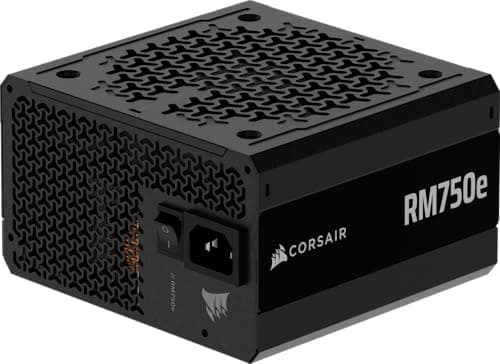
CORSAIR RM750e ATX 3.1 PCIe 5.1, 750 W
RM750e ATX 3.1 PCIe 5.1, 750 W

ATX 3.1 and PCIe 5.1 in a 750 W unit, which is the connector generation you want if a modern graphics card is anywhere in the plan.

Best overall power supply
8.5
$89.99Amazon (affiliate link)
02
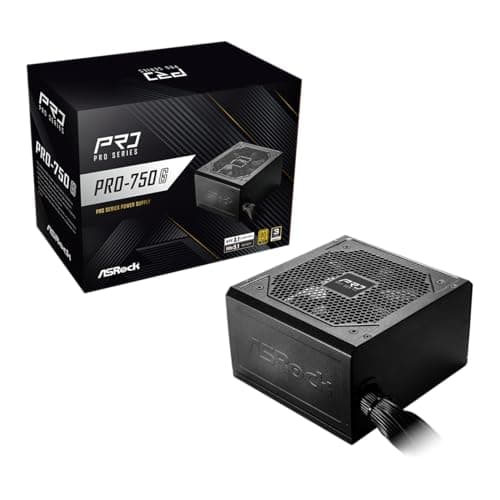
ASRock PRO 750G, 750 W 80 PLUS Gold
PRO 750G, 750 W 80 PLUS Gold

80 PLUS Gold certification and a native 12V-2x6 connector at the price budget units usually charge for Bronze and an adapter.

Best value power supply
8.5
$54.99Amazon (affiliate link)
03
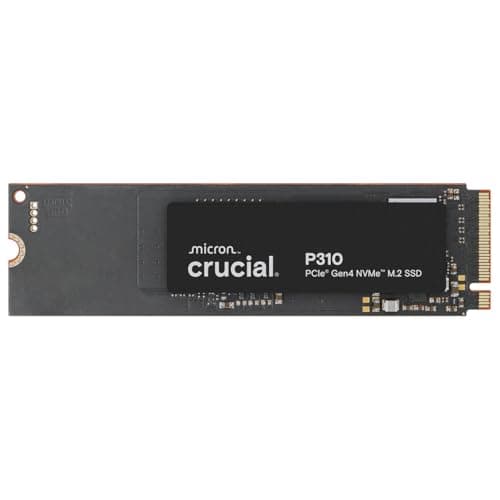
Crucial P310 1 TB PCIe Gen4 NVMe M.2 2280
P310 1 TB PCIe Gen4 NVMe M.2 2280

A stated 7,100 MB/s Gen4 drive in the standard M.2 2280 length, which is the format nearly every current motherboard takes without an adapter.

Best boot drive
8.3
$166.81Amazon (affiliate link)
04
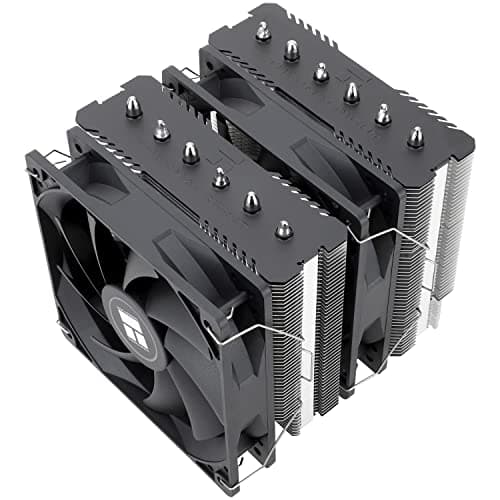
Thermalright Peerless Assassin 120 SE Dual-Tower Air Cooler
Peerless Assassin 120 SE Dual-Tower Air Cooler

Six heat pipes and two 120 mm fans in a dual-tower layout, with mounting hardware for both current AMD and Intel sockets in the box.

Best air cooler
8.8
$34.90Amazon (affiliate link)
05
CORSAIR 4000D RS ARGB Mid-Tower ATX Case
4000D RS ARGB Mid-Tower ATX Case

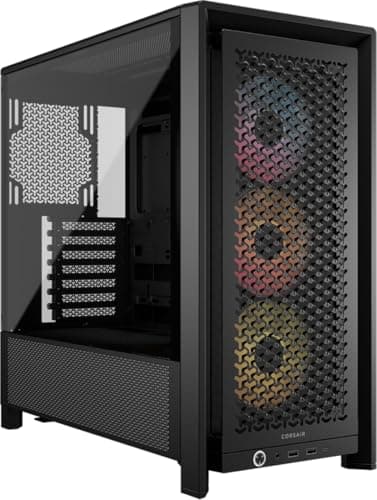
Three fans pre-installed in a high-airflow mid-tower, which means the case arrives able to move air rather than needing a fan order to be usable.

Best case for airflow
8.3
$79.99Amazon (affiliate link)
06
Thermalright TL-C12C 120 mm PWM Case Fans (3-pack)
TL-C12C 120 mm PWM Case Fans (3-pack)

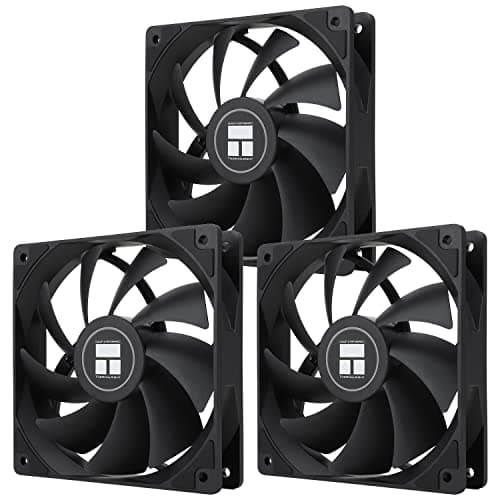
Three 4-pin PWM 120 mm fans rated to a stated 1550 rpm, which is the cheap upgrade that makes a quiet build out of a loud one.

Best budget case fans
8.3
$10.71Amazon (affiliate link)
07
MOROVOL 621 Mid-Tower ATX Case with 4 Pre-Installed RGB Fans
621 Mid-Tower ATX Case with 4 Pre-Installed RGB Fans

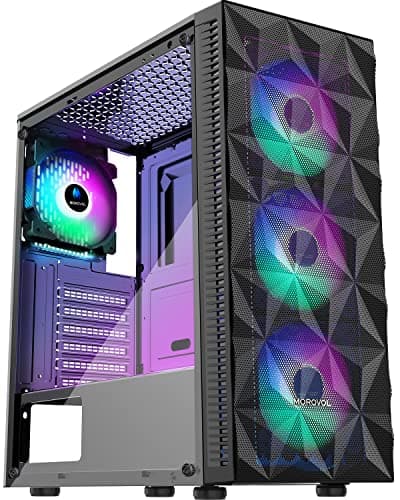
Cheap, and it does come with four fans and a glass panel. What the listing does not give you is the only number that decides whether your parts fit.

Skip this one
5.5
$49.99Amazon (affiliate link)

#ad · Live prices from the Amazon Creators API, as of Sep 5, 2026. Where we have no verified live price we show none — a gap beats a number that has rotted.

In detail

The picks, in full

01
CORSAIR RM750e ATX 3.1 PCIe 5.1, 750 W

Best overall power supply

RM750e ATX 3.1 PCIe 5.1, 750 W

750 WATX 3.1PCIe 5.1 readyFully modular
8.5/10

ATX 3.1 and PCIe 5.1 in a 750 W unit, which is the connector generation you want if a modern graphics card is anywhere in the plan.

Performance
9
Build quality
9
Compatibility
9
Value
7

What's good

  • Native modern GPU power connector removes the adapter, and adapters are where high-current connections fail
  • 750 W is the sweet spot for a single-GPU build — enough headroom to run near peak efficiency rather than near the limit
  • Fully modular means you only install the cables the build actually uses, which is half of cable management solved at purchase

What's not

  • Costs meaningfully more than a bronze-rated unit of the same wattage
  • 750 W is not enough headroom for the highest-draw enthusiast graphics cards
  • Modular connectors are not cross-compatible between brands, so keep the cables with the unit

Skip it if…

you are reusing an older graphics card with 8-pin connectors and no upgrade planned. You are paying for a connector standard you will not use.

$89.99See it on Amazon (affiliate link)

$114.9922% off

Price as of Sep 5, 2026. Prices move — Amazon's is the one that counts.

#ad · we may earn a commission from this link to RM750e ATX 3.1 PCIe 5.1, 750 W

02
ASRock PRO 750G, 750 W 80 PLUS Gold

Best value power supply

PRO 750G, 750 W 80 PLUS Gold

750 W80 PLUS Gold certifiedATX 3.1 and PCIe 5.1Native 12V-2x6 connector
8.5/10

80 PLUS Gold certification and a native 12V-2x6 connector at the price budget units usually charge for Bronze and an adapter.

Performance
8
Build quality
7
Compatibility
9
Value
10

What's good

  • Gold certification is a third-party efficiency test, not a marketing claim the brand made about itself
  • Native 12V-2x6 means no adapter on the highest-current cable in the machine
  • 120 mm fan on a 750 W unit runs slowly enough that it is not the loudest thing in the case

What's not

  • Shorter warranty than the premium units, and warranty length is a reasonable proxy for a maker's own confidence
  • Not fully modular at every price listing — check which variant you are buying
  • Less headroom for a future high-draw card than an 850 W or 1000 W unit

Skip it if…

the build is a workstation that runs at load for hours a day. Efficiency and warranty both matter more there, and the premium unit repays it.

$54.99See it on Amazon (affiliate link)

Price as of Sep 5, 2026. Prices move — Amazon's is the one that counts.

#ad · we may earn a commission from this link to PRO 750G, 750 W 80 PLUS Gold

03
Crucial P310 1 TB PCIe Gen4 NVMe M.2 2280

Best boot drive

P310 1 TB PCIe Gen4 NVMe M.2 2280

1 TBPCIe Gen4 NVMeM.2 2280Up to 7,100 MB/s stated read
8.3/10

A stated 7,100 MB/s Gen4 drive in the standard M.2 2280 length, which is the format nearly every current motherboard takes without an adapter.

Performance
9
Build quality
8
Compatibility
9
Value
7

What's good

  • M.2 2280 is the length that fits the most boards, which removes the most common storage fitment mistake
  • 1 TB is the capacity where you stop deleting games to install games
  • Sequential speed figures are stated on the listing rather than implied by a generation label

What's not

  • Sequential read figures are a best case and are not what you feel in day-to-day use
  • Gen4 drives run hot enough that a motherboard heatsink genuinely matters
  • Faster on paper than Gen3 in ways most desktop workloads never notice

Skip it if…

your board only has Gen3 slots. The drive will work and will run at Gen3 speed, so buy the cheaper Gen3 part and put the difference into capacity.

$166.81See it on Amazon (affiliate link)

$179.757% off

Price as of Sep 5, 2026. Prices move — Amazon's is the one that counts.

#ad · we may earn a commission from this link to P310 1 TB PCIe Gen4 NVMe M.2 2280

04
Thermalright Peerless Assassin 120 SE Dual-Tower Air Cooler

Best air cooler

Peerless Assassin 120 SE Dual-Tower Air Cooler

6 heat pipesDual 120 mm PWM fans1550 rpm statedAM4/AM5 and LGA 1700/1851 mounting
8.8/10

Six heat pipes and two 120 mm fans in a dual-tower layout, with mounting hardware for both current AMD and Intel sockets in the box.

Performance
9
Build quality
8
Compatibility
8
Value
10

What's good

  • Air cooling has no pump to fail and no coolant to lose, which is the argument that matters over a five-year build
  • Two fans at moderate rpm move the same air as one fan at high rpm and make far less noise doing it
  • Bracket coverage across both AMD and Intel means it survives a platform change

What's not

  • Dual-tower coolers are tall — check case clearance before ordering, every time
  • Can overhang the first memory slot depending on module height
  • Heavy enough that the board flexes; support it during transport

Skip it if…

the case is small-form-factor. Height clearance is the constraint there and a low-profile cooler is the only correct answer.

$34.90See it on Amazon (affiliate link)

Price as of Sep 5, 2026. Prices move — Amazon's is the one that counts.

#ad · we may earn a commission from this link to Peerless Assassin 120 SE Dual-Tower Air Cooler

05
CORSAIR 4000D RS ARGB Mid-Tower ATX Case

Best case for airflow

4000D RS ARGB Mid-Tower ATX Case

Mid-tower ATXHigh-airflow front3 pre-installed fansModular mounting rail system
8.3/10

Three fans pre-installed in a high-airflow mid-tower, which means the case arrives able to move air rather than needing a fan order to be usable.

Performance
8
Build quality
8
Compatibility
9
Value
8

What's good

  • Three fans included is genuinely three fans you do not buy, and fan cost adds up fast
  • A mid-tower has the depth for a dual-tower cooler and a long graphics card without a fight
  • Space behind the motherboard tray is the single feature that decides whether cable management is pleasant

What's not

  • Bigger than a compact case, and desk space is a real constraint
  • ARGB adds cables and a controller you may not want
  • Costs more than the budget cases that ship the same fan count

Skip it if…

the machine lives on a desk in a small room. Measure first — mid-towers are consistently larger in person than they look in a product photo.

$79.99See it on Amazon (affiliate link)

$124.9936% off

Price as of Sep 5, 2026. Prices move — Amazon's is the one that counts.

#ad · we may earn a commission from this link to 4000D RS ARGB Mid-Tower ATX Case

06
Thermalright TL-C12C 120 mm PWM Case Fans (3-pack)

Best budget case fans

TL-C12C 120 mm PWM Case Fans (3-pack)

120 mm4-pin PWMUp to 1550 rpm stated3-pack, fluid dynamic bearing
8.3/10

Three 4-pin PWM 120 mm fans rated to a stated 1550 rpm, which is the cheap upgrade that makes a quiet build out of a loud one.

Performance
7
Build quality
7
Compatibility
9
Value
10

What's good

  • 4-pin PWM lets the motherboard slow them down; 3-pin fans run at one speed and that speed is usually too fast
  • A stated 1550 rpm ceiling is modest by design, which is why they are quiet
  • Three at once is what an intake-plus-exhaust layout actually needs

What's not

  • Static pressure is not stated, and radiators and dense filters want a pressure-optimized fan
  • No RGB, if that matters to you
  • Cable length is short enough that a bottom-mounted fan may need an extension

Skip it if…

they are going on a radiator or through a restrictive filter. Buy a stated pressure-optimized fan for those positions.

$10.71See it on Amazon (affiliate link)

$11.9010% off

Price as of Sep 5, 2026. Prices move — Amazon's is the one that counts.

#ad · we may earn a commission from this link to TL-C12C 120 mm PWM Case Fans (3-pack)

07
MOROVOL 621 Mid-Tower ATX Case with 4 Pre-Installed RGB Fans

Skip this one

621 Mid-Tower ATX Case with 4 Pre-Installed RGB Fans

Mid-tower ATX4 pre-installed RGB fansMesh front, tempered glass sideUSB 3.0
5.5/10

Cheap, and it does come with four fans and a glass panel. What the listing does not give you is the only number that decides whether your parts fit.

Performance
6
Build quality
5
Compatibility
3
Value
8

What's good

  • Four fans and tempered glass for less than most cases charge for the shell alone
  • Mesh front is the right idea for airflow
  • Fine as a bench or spare-parts chassis where fitment is already known

What's not

  • The listing sells fan count and lighting and does not state maximum GPU length, CPU cooler height or radiator support
  • Those three clearances are what actually decide whether a build fits, and finding out after delivery is the expensive way
  • Budget cases in this bracket typically have little room behind the tray, which is where the cables have to go

Skip it if…

you have already chosen a graphics card and cooler. Buy a case that publishes its clearances and check them against your parts — that check takes two minutes and prevents the one build mistake you cannot work around.

$49.99See it on Amazon (affiliate link)

$52.495% off

Price as of Sep 5, 2026. Prices move — Amazon's is the one that counts.

#ad · we may earn a commission from this link to 621 Mid-Tower ATX Case with 4 Pre-Installed RGB Fans

The order to buy in

1. Monitor first, if it is not already decided

Resolution and refresh rate set the graphics requirement, not the other way round. Buying a card and then discovering the monitor is 1080p at 60 Hz means paying for frames nothing can display.

2. Graphics card or processor, per the sentence

Whichever your one-sentence job description points to. Spend the largest slice here and accept that this is the part with the shortest useful life.

3. Motherboard, chosen by sockets and slots

Socket compatibility is binary. Beyond that, count the M.2 slots you will use, the memory slots, and the rear ports. Feature lists beyond those are mostly upsell.

4. Memory and storage, by capacity

Enough memory that the system is not swapping is worth more than fast memory that is not enough. Same logic for storage: capacity first, generation second.

5. Power supply, case and cooling — from the reserved slice

Not from what is left. This is the slice that keeps the machine alive, and every one of these parts routinely survives two builds.

Mistakes that are expensive rather than annoying

  • Not checking case clearances. A graphics card that does not fit is the one build error you cannot work around.
  • Adapting an old power supply to a new GPU connector. High current across an added junction, for the sake of saving on the one component you should not save on.
  • Buying the biggest wattage instead of the right wattage. Efficiency falls away at very light load, and you paid for capacity you never use.
  • Ignoring cooler height and memory clearance. Both are published. Both are skipped. Both end in a second order.
  • Leaving cable management to the end. It is a build step, not a decoration, and doing it last means doing it badly.
How these were picked

I haven't handled these. Here's what I did instead.

Everyone in this category says they tested twenty of these. I haven't tested any, and I say so. What I do instead: read the manufacturer's manual and published specification, compile the numbers that decide the purchase, do the arithmetic in the open, check the live price, and name one product to skip. The scores above are judgments from that research against a published rubric — they are not measurements I took, because I do not have a lab and I am not going to pretend otherwise.

Questions

Frequently asked

How much of the budget should go to the graphics card?
For a gaming machine, the largest single share — it is the part deciding frame rate in almost every game. For creative or compile work, move that share to the processor and to memory capacity instead. Start from what the machine is for, not from a fixed percentage.
What does 80 PLUS Gold actually mean?
That the unit was tested by the 80 PLUS program at defined load points and met the Gold efficiency tier. It is one of the few claims on a PC component listing that is verified by somebody other than the manufacturer.
Do I need an ATX 3.1 power supply?
If a modern high-draw graphics card is in the plan, yes — you want the native 12V-2x6 connector rather than an adapter, because an added junction on the highest-current cable in the machine is where problems start. If you are reusing an older 8-pin card, you do not.
Will a Gen4 SSD work in a Gen3 slot?
Yes, at Gen3 speed. If the board is Gen3 only, buy the cheaper Gen3 drive and put the difference into capacity — you will notice the extra space and you will not notice the sequential figures.
What is the most common build mistake?
Not checking case clearances: maximum GPU length, maximum CPU cooler height and radiator support. All three are published by good case makers, all three are routinely skipped, and a part that does not physically fit is the one error you cannot work around.

Keep reading

Receipts

Sources

We do not run a testing lab and we do not pretend to. Where a measured number came from a manufacturer's published specification or someone else's lab, we name them and link them. Where we could not verify something, we say so on the page rather than quietly leaving it out. Read the full method.